
The Official MU Helper system is fully built into the game client and requires no additional software or resources.
- The key button opens the helper settings. You can also open the settings by pressing Z.
- The Play button starts the helper; your inventory must be closed when you press it.

Capabilities
Assistance with both long- and short-range combat: potions, buffs, loot pickup and skills.
Usage Terms
Any player who has reached level 10 can use the helper. For every five minutes of using the helper, 50,000 zen is automatically deducted from the player's balance.
Settings
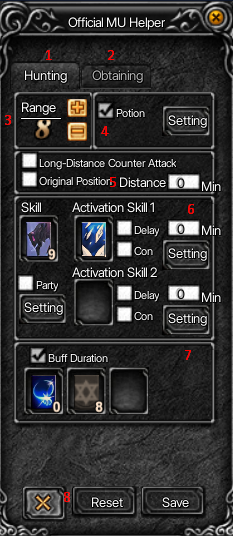
The helper has two tabs: Hunting (1) and Obtaining (2). The numbers below correspond to the marks on the screenshots.
Hunting
- Select the radius (attack range).
- Automatic use of Healing Potions: check the box to enable this feature. By clicking the Setting button, you can also set the HP threshold at which the potion will be used. The lighter the bar, the lower the minimum HP for using a Healing Potion, and vice versa.
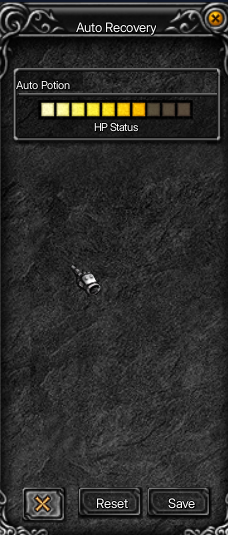
- Long-Distance Counter Attack — enables long-range counterattack mode.
Original Position — returns you to the original position: if this option is enabled, the character will return to the original position after collecting loot. - You can set either a single combat skill in the main skill field (Skill) or two combat skills in the Activation Skill 1 and Activation Skill 2 fields. If you set two skills, you can also specify the delay between them: check the Delay box and enter the time (in seconds) before switching to the second skill. To set up auto-attack when monsters attack you, check the Con box, click the Setting button and enable the corresponding settings. Repeat the same steps for the second skill.
- Permanent buff mode (Buff Duration): set the buff you need, and it will be refreshed automatically.
- Reset and Save the settings.
Obtaining
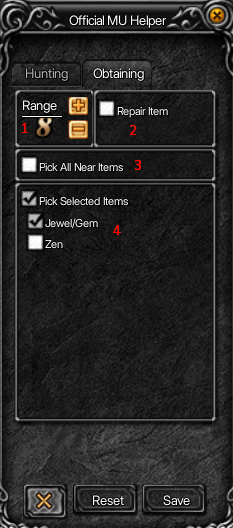
- Select the loot pickup radius.
- Automatic equipment repair (Repair Item).
- Pick up all nearby items (Pick All Near Items).
- Pick up selected items: jewels (Jewel/Gem) and zen.